Thursday, January 02, 2014

Buiding the Box (Building MAME: The Cabinet.)

When looking at all available designs and previously built MAME cabinets you soon find out that there is not just one universal design. And actually if you take a closer look at all the original cabinets you'll see they also differ a lot.
 I decided to take the 'Defender' design which is available as a Sketchup model. Imported it into the free 'DesignSpark' solid modeller and just projected the side of the box  on the piece of MDF I had available. This also gave me the chance to make it less deep. Since my cabinet will be fitted with a slim LCD screen instead of a bulky monitor it can be a lot smaller than the original. From the model I created the following plan-view of the side:
From there its just a matter of transferring the design to the board and use a jigsaw to shape them.
It's hard to saw straight lines using a jigsaw, so I first clamp on a piece of wood to align the saw. And when you just clamp two identical pieces of MDF together when you are sawing you get two perfectly identical sides.
Note that sawing two layers at the same time like this probably only works if you use 8 to 10 mm MDF. If you use it on thicker material it is very hard to keep the jigsaw exactly vertical and if it is slightly tilted your lower board will have a different size than the top one.

After I created the two sides I just estimated the optimum width by just holding the monitor next to one of the plates and finding good position. 50 cm seems like a good width so I just made the second MDF board exactly 50 cm wide. By doing this very carefully and making sure all corners of the board are now exactly 90 degrees it will be easy to create all front, top and rear surface plates.
And then we paint..and paint
and paint..and paint...
 Yes, two layers of MDF primer on each side is the minimum. Because MDF sucks... And that I mean literally. It just sucks up paint so for a good final finish you just have to primer it first.

Drilling the holes for the buttons. Using a 28 mm speed drill creates nice clean holes, but you must drill half way from one side, reverse the board and drill the rest from the other side.
Glue on the supporting blocks. I used a 20x20 wooden stick that I found in the shed. It's painted wood so using wood glue is not optimal since that is supposed to be applied to unpainted surfaces. Using a Polyurethane based construction adhesive is better.
In the mean time I keep refining the 3D model. And it's actually progressing faster than the real thing:

But after assembling the main parts it starts to look like real:
Next step would be to create the perspex cover for the control panel. I chose a standard 100x50 cm, 2mm thick perspex sheet which is available at almost every large hardware store. It was actually a coincidence that I chose 50 cm for the inner width of the cabinet but it's very convenient now since the perspex only has to be cut to length. And cutting perspex appeared a lot harder than I expected. First I tried to saw it using a fine pitch wood-saw intended for cutting laminate flooring. That does not work. The cut is very irregular and pieces just tend to break off. Second I tried cutting it using a hobby knife. This might be possible but its very hard to get one straight cut. Even if you use a steel ruler as a guide the knife just runs off if you are not very careful. After creating the cut (it's impossible to cut through the perspex) you can break it on the edge of a table. That does work but if the cut is pot too deep and not very straight you will get a very irregular edge with razor sharp points.
Finally used the blade  of a fine tooth hack-saw. That works better but it is essential that you carefully support both sides of the cut or the perspex will break.

Then the holes. This turned out to be even harder and it took me three attempts and a full panel of perspex before I finally had one that did not have cracks, or even completely destroyed edges. My tips for making holes:

Hole saw
- Use a vertical drill and push the drill very slowly. If you drill too fast the perspex will crack.
- Start every hole by drilling a small (3mm) hole in the centre. Then slowly increase the size of the drill but not more than 2 mm for every next step.
- Drill any hole larger than 10 mm using a hole-saw ! Trust me, any other drilling device (like a step-cone drill for example) will crack the perspex. This has one disadvantage. The arcade buttons require a 28 mm hole and this somehow seems to be a very uncommon size. So far I just found one set that has the 28 mm included.
- Support the perspex with wood and use a fresh piece for every hole so there is no hole in the wood under the perspex before you start the drilling.


CRACK !
 - Make sure you push down the perspex firmly and close to the drill. If you don't, the perspex might just jump up and crack.
- Don't drill too close to the edges. If there are holes near the edge of your control panel (like there are on mine) make the sheet larger, drill them first and then cut the sheet to size.


But finally with the inside painted deep-blue and the control panel covered with the perspex sheet it starts to look really good:
Creating the front bezel was actually very simple. First cut the perspex to size, place it in the cabinet and install the monitor so you can see were the screen is. Mark this on the perspex (I kept about 1 cm marging around the actual screen). Then (using a very sharp knife and a steel ruler) cut the protective foil and remove it on the edges. Then spray paint it a few times until the edges are really black. Make sure it really dry before removing the protective foil from the centre. And it looks really awesome when you look at it from the other side.

With the front-bezel installed, running LadyBug:
On the pedestal, with the top marquee installed:


Wednesday, January 01, 2014

It's all about Control. (Building MAME: The Controller)

Using the Arduino as a MAME interface.

MAME software runs on a computer. And modern computers do not have any simple I/O pins any more .(remember the parallel port that used to be on every computer for connecting a printer ?) So to connect switches and joysticks you will need some kind of interface that translates switch actions to USB. Early MAME builders cracked open standard keyboards and hard wired their switches to the different keys. This worked, but was quite difficult. Especially low cost keyboards did not have easy to solder contacts or convenient connectors to hook up to. Nowadays the most common solution is a dedicated controller that has lots of easy connectible inputs and USB output that just pretends to be standard keyboard. Best known are the UltiMarc I-Pac , OptiPac or J-Pac. An even lower cost solution are the Xin-Mo controller boards (aroun US$25,-, including the wires).
But to keep the cost to a minimum I intend to use what I already have...

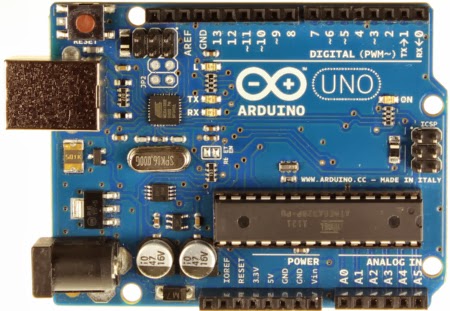
The cheapest solution would be to use my FunDuino UNO R2 board. ( A cheap Chinese Arduino clone that ships at US$13,- from DealExtreme)
It's got 14 digital I/O pins so that should  be enough for an 8 way joystick + 7 buttons. (An 8 way joystick only has 4 switches). Since one of the buttons is just the 'Start' button so it will not need a fast response time I could also connect that to one of the analogue inputs and thus free 4 I/O pins for controlling additional stuff like lighting, sound or LEDs.
What I need is the Arduino to emulate a keyboard or to behave like a 'HID' (Human Interface Device). And if you know what to look for something like this is easy to find. Like on the blog of MitchTech. Now I did not immediately get the idea of this, until I realised that the Arduino board actually contains TWO different micro-controllers. One is the main controller (a ATmega328) that runs the Arduino 'sketches' and a second one (ATmega16u2) that just takes care of the USB communication from your PC to the main controller. And this communication controller is what we are re-programming to switch from a virtual COM port to a HID device.
First we will need a 'DFU' programmer. I use Windows, so I'll use 'FLIP' The procedure seems simple enough. Reset the Arduino, use FLIP to upload firmware. But I seem to have a problem with the reset. When I release the reset the board starts running the last sketch I've programmed it with, and it certainly does not show up as a new device. Which in turn is required so I can install the USB driver that FLIP needs. And of course I just overlooked something. When you have a non SMD Arduino board you should solder a resistor at the back. Yes, that is mentioned on the MitchTech page... (And it's no longer required with the latest revision of the Arduino UNO)
I just assumed I had a SMD board since there are many SMD components on the top of the board. But it's probably only so if the processor itself is a SMD version.
And indeed, when the resistor is mounted and we short circuit the two pins, left-top of the board, the unit shows up in the Windows device manager as a 'DFU' device. Left click on it, select 'Update Driver' and select the driver from the FLIP->usb directory. Then it shows up as an A90USB8. And when we unplug it and plug it back in it is again visible as the virtual serial port. 

Now we need to know what codes should be sent when a button is pressed. Which keys do we need to play MAME games ?
The full overview is on this page. And this is the selection of the ones I think I'll need:
Key                  Function               HID Key  
5                    Insert coin            34
1, 2                 Start (players 1, 2)   30,31
Arrow keys (U,D,L,R) Move Joystick          82,81,80,79
Left Control         Button 1               Bit0
Left Alt             Button 2               Bit2
Space                Button 3               44
Left Shift           Button 4               Bit1
Z                    Button 5               29  
X                    Button 6               27
ESC (Escape)         Quits the game         41

('Bit0..Bit2' marks a bit in the Modifier byte)

First I just used the MitchTech sample program. This just detects what pin is activated, sends a single key and then after 100 mS a 'releasekey' command. So if you press and hold a button you are sending 10 keydown / key-release commands per second. This works, but not very good. Most MAME games do not respond very well to a constant stream of key-presses. The movements often get a bit jerky, probably due to a regular key-buffer overload. Also it just sends one key at a time while the keyboard code does allow for multiple keys.
In my program I created a loop that checks every time which contacts are closed, find the keyboard code that has to be generated for that contact and add that to the keyboard message. Then only send the message itself when its different from the previous one. And when a key is released its code is forced to 0 so a key-release is only sent once. Also I use some analog inputs as extra inputs for buttons by just reading the voltage on that input. Note that these inputs are 'floating' so if they are left open the result may be unpredictable. You will need to add pull up or down resistors to the inputs.

So in the end the program looks a lot different but does exactly what I need:

MAME.ino (on my Google Drive)

Now what I love about software: you can re-configure the buttons and joystick at no cost after you wired them...
 I know most people use wires with crimp-on connectors for wiring their controls, but I just love soldering and for me this is much faster too. So I soldered all connections to the joystick and the plug on the FunDuino board. Here the buttons are not connected yet, but the black wire will serve as common ground for these.
Testing is a little hard since most normal software does not really show you if you pressed a Control or Shift key. But the 'GhostKey' program is an extremely simple way to test what code your keyboard is sending.
While testing this set-up with the actual buttons I noticed another problem. How do you insert a 'coin' to get the game started when you don't have an actual coin-slot ?  
I decided to make the 'Single player - start game' button to double as a coin insert. That's the benefit of having a programmable controller. Now it just checks the state of the 'start game' button and if it's pressed for more than 2 seconds it sends key '5' (Insert Coin) . But if you release it sooner it just sends '1' (Single player start).

Wiring it was pretty easy. As shown on the right I screwed the Arduino to the bottom and glued a small breadboard next to it. This way it is fully reconfigurable and I can just add some pull-up resistors if needed. The only thing that worries me a bit is that the breadboard is upside-down and the wires could fall out, but that has not happened yet. And when everything works fine I can make a more permanent solution.


(Note: If you start out without a board and want to buy one it is probably better to choose the Arduino Micro since that has 20 I/O pins and  'mouse' and 'Keyboard' commands built in)

Ctrl Alt and....CRASH..
After a while I noticed that the system sometimes seems to crash while playing games that use both the A and B button. Some further investigation showed that it actually happened when pressing the buttons AND moving the joystick Left or Up. What actually happens is that you create the key combination Ctrl Shift and Left arrow, which is caught by the Intel graphics driver. So it just rotates the screen, or changes the resolution and (worse) throws you back to the main window. The solution was simple. Left click on the desktop, select 'Graphic options' and in the Intel graphics settings just disable hotkey support.

Saturday, June 22, 2013

The shortest path to serving a 'Hello World' using Apache and Python WSGI on Windows


So you want to create a website or service with some dynamic content, using templates, database and some code ? Get ready to choose form a gazillion choices in languages, frameworks and design patterns. And one of them is using Apache as the server, Python as the language and the Web Server Gateway Interface (WSGI)  to link them. All three are documented abundantly but for some reason I have not found a simple step by step guide to set it up on a Windows machine and just get 'Hello World' to show up in my browser. So here is how I did it.

Install Python. It's a standard Windows installer so that's just point and click. Then make sure the path to 'python.exe' is in your PATH environment variable

Install Apache using XAMPP.  This is also available as Windows installer and you can also install MySQL, FileZilla, Tomcat and Mercury. I'd advice to install at least MySQL. After all a database is one of the minimal requirements for most websites. In my example XAMPP is installed to D:/Xampp.
Using the XAMPP control panel, start Apache and make sure it's running: open a browser and type 'localhost' as the URL. If it works it will show the XAMPP configuration screen.

Now get the 'wsgi_mod.so' binary that matches your configuration. It must be the 32 bit or 64 bit version depending on system AND it must match the Apache version that is installed. Now XAMPP does not really show you which version it is using so the easiest way to find out is looking at the CHANGES.txt file in the apache folder. The current version of XAMPP (June 2013) contains version 2.4.3. This means that none of the 'wsgi_mod.so' files on the google.code page will work since they all target version 2.2 ! 
I Googled for 'mod_wsgi apache 2.4' and found it in the Apache Lounge .

Copy the 'wsgi_mod.so' to the 'apache/modules/' folder.
Add this line to 'httpd.conf' to load the mod_wsgi module:

LoadModule wsgi_module modules/mod_wsgi.so


Stop and start Apache to make sure it's still working.


Create a directory D:/Xampp/wsgi. Make sure you can run python scripts in this directory: open a command window, make sure you're in this directory and just type 'python'. If all is well it will show the installed python version and a command prompt. If not, check the environment variable 'PATH' and make sure the python folder is included.

Add the following lines to  'httpd.conf'. This will allow access to the wsgi directory, and make sure all wsgi requests are routed to the directory:

<Directory "D:/xampp/wsgi" >
    AllowOverride None
    Options None
    Require all granted
</Directory>

# Python WSGI interface module
<IfModule wsgi_module>

  WSGIPythonHome "D:/Python27"
  WSGIScriptAlias / D:/xampp/wsgi
</IfModule> 


Now create a text file with the following contents:

  def application(environ, start_response):
    status = '200 OK'
    output = 'Hello World!'

    response_headers = [('Content-type', 'text/plain'),
                        ('Content-Length', str(len(output)))]
    start_response(status, response_headers)

    return [output] 


Save it as 'hello_world.wsgi' in the 'wsgi' directory 
Open your browser and type 'localhost/hello_world.wsgi'. And yes: It will show 'Hello World' !


Note that strictly spoken the 'WSGIPythonHome "D:/Python27"'  is not required for this example, but if you want to add code that uses the 'import' statement Apache needs to know where to find your Python directory.

UPDATE : The 64 bit difference

After writing the initial post I changed computers to a 64 bit Windows 8 laptop. And then it suddenly does not work as advertised. Xampp installs without a problem, but it seems impossible to get Apache to load the mod_wsgi.so module. When I startup apache manually using the command prompt it stops on 'mod_wsgi is not a valid Win32 application'.  And even after trying several different versions of mod_wsgi.so it will not start. As I expect it has to do with the fact that this is 32 Bit Apache running on a 64 bit system it might be better to install a 64 bit version. Just download the installation from https://www.apachelounge.com/download/win64/ and extract the zip file. It's not really an installer, this will just unpack a complete apache folder with all binaries and required subfolders. If we now just replace the original xampp/apache folder with the one we just unpacked it will work just fine. Make sure you first save the httpd.conf file, or it will be overwritten and you'll have to apply all the changes for using the wsgi module. 

Tuesday, November 13, 2012

Going straight to Windows 8

I've been using Windows XP now for probably the whole 10 year of it's existence. Skipped Vista and Windows 7 because it just still worked for me. But now Windows XP is finally officialy declared obsolete and Microsoft generously offers the Windows 8 upgrade for only €29,- it's time for a change.
And these are my experiences so far.

The 'old' laptop
Still a bit scared of the transition I decide to try some things first on an old laptop. It's an ACER 2410 Travelmate with a 1 Ghz Intel Celeron and 1 GB memory running Windows XP. The 80 GB harddisk is partitioned in a C an D drive, both 40 GB in size and using FAT32.
First it appears installing Windows8 on a FAT32 disk with just 16 GB free storage is probably not a good idea. The installer just crashed twice without a clue why. So I first joined the two partitions using a partition manager (I used Paragon Partition manager, but there are many). Then I converted the resulting disk to NTFS using the command-line 'convert C: /fs:ntfs '
This finally seemed to solve it and although the installation took nearly three hours it succeeded. And it works fine. I installed some of my 'mission critical' applications (Borland C++Builder 5, Goldmine CRM, Visual Studio 2008) and that all worked fine.

The Work laptop.
This is more modern Toshiba Tecra 10A with a dual core Intel  at 2.8 Ghz, 2 GB memory and a 150 GB hard-drive. This drive is using NTFS, but it's also partitioned in a 60 GB and 90 GB section.
As expected the installation is easier here. There are no crashes and it takes somewhere around one and a half hour to complete.

Networking and Domain
Now if you have a work laptop that needs access to a domain take care of that first.
Here is an article on how to connect to a domain. (or the short version on SuperUser).
Then it might be useful to connect your domain account to your Microsoft account.

Viruschecker and security
What I used to do first on any PC is installing Security Essentials. But this is not necessary any more since Windows 8 comes with 'Defender' which is exactly the same. So no need to install additional software for this.

Installations that require .NET 2.0 or 3.5. 
Even though Windows 8 comes with .NET 4.5, some software requires .NET 2.0 or 3.5 to be present. It can be installed as described in this MSDN article 'Installing the .NET Framework 3.5 on Windows 8'.
NOTE: Installing a Windows language pack on Windows 8 before installing the .NET Framework 3.5 will cause the .NET Framework 3.5 installation to fail. So since there probably will be lot of .NET 2.0 software around for a while it might be a good idea to just do this for every installation.

Changing the language
One of the nice features of Windows 8 is the ability to switch languages even after you installed it. If you go to 'Control Panel -> Clock, Language and Region -> Language' you can just select another language.
The article Using the language you want by Steven Sinofsky explains it all.

TinyCAD application fails
The only software so far the does not work is TinyCAD , an open source schematics drawing program. It installs fine and runs but when you click File Open or Save it just gives a error:
'Encountered an improper argument'. Everything else works fine, bur if you cannot load or save files it's pretty useless. Selecting 'Windows XP compatibility mode' when running does not solve the problem. I tried to find a solution but nobody has found one yet.So for the time being it just has to run in an Windows XP on Virtual box

VirtualBox
The virtual PC software VirtualBox runs very smooth on Windows 8. Since Windows XP mode is no longer included in Windows 8 this is your only chance left if older software fails to run.

E-Mail
Originally my idea was to avoid additional software and just stick as much as possible to the standard installation. Since there is such a nice e-mail tile on the start page I decided to go with that. Unfortunately it apparently does not support the POP3 protocol, so this attempt failed immediately and I had to install Thunderbird. Which works fine...

Matrox DualHead2Go (Multiple monitors)
 As a developer you can never have too much screen-space so I use the Matrox DualHead2Go adapter to connect an additional 2 monitors to my laptop. This always worked fine on Windows XP but on Windows 8 it really rocks ! It automatically switches to expanded desktop as soon as you plug in the adapter and returns to single screen mode when you take it out again. Even though the desktop is expanded, both screens get their own task-bar and charms. So if you open the 'Tiles' or 'RT' interface on your laptop screen it appears only there and the other screens just continue to show the desktop. And then, if you opened an RT program that fills the laptop screen you can just grab it and drop it to the monitor.

Sticky notes
Windows 8 has it's own 'sticky notes' that do exactly what you'd expect. You can write them, change colors or font and stick them anywhere on the screen. Probably enough for most people, but I prefer the 'Stickies' by Zhorm Software . These are much more versatile. You can save and recall them, use them as an alarm clock and give them adjustable transparency. And they work fine on Windows 8...

Experience
After using it for a few days I must say I'm impressed. Of course it takes some time to get used to the new interface and all the little differences between XP and 8 but the search function in the charms makes it super easy to find anything you need. And when you are used to it it just works a little faster. Like on my XP machine when it recovered form hibernation it would not reconnect to my companies network. I always first had to log off and log in again to get access to our server. Windows 8 just does this automatically.
When switching my laptop off I always had to remember first to switch the desktop to my laptop screen or else if I switched it on without the external monitor my desktop would sometime still be off screen. Again: no problem on Windows 8. You can connect or disconnect a monitor anytime and the desktop will just restore to the most optimum settings. And with Fences installed all your icons will always be in the right place.

And it definitely pays off to learn some of the Windows-key shortcuts like:


Windows-C : Show the charms
Windows-D : Go to the desktop
Windows-X : show most common administrator settings
Windows-Tab : Switch between apps and desktops (And Alt-Tab of course still works to switch between applications)
Windows-R : Display the 'Run' window

And there are many more as listed here on the 'List of Windows 8 Shortcuts'.


Sunday, October 14, 2012

Pi on the Side.

So I bought a Raspberry Pi. Just in the unlikely case you have not heard of this credit card sized Linux computer at the incredible $35 price-point you can read all about it on the Wikipedia entry. And since I will try to write down my experiences I decided to create a separate blog for it.:

I Spy My Pi

(which does not really mean anything, it just sounds nice..)

Sunday, January 15, 2012

Back to The Valley. (in 8-bit country)

August 3, 1977 was the public introduction of the TRS-80 home computer. Which is as I write this is more than 35 years ago. The most recent episode of this developers life ('Dinosaurs') brought back memories to this first real computer I could get my hands on. The setup as shown here is exactly what my father bought about thirty years ago. A black and white 12" monitor (16 lines of 64 characters), a 1.77 MHz processor and 16KB of RAM. Program storage on a cassette tape recorder which meant loading a decent game would often take 10 minutes or more. And to me it was magic. From the very first time I switched it on and saw the READY> prompt I was hooked. To programming. I remember it started with the sample from the owners manual. No, not the obligatory 'hello world' but a Celsius to Fahrenheit conversion program. And after completing all samples I did a very simple Space Shooter. Written all in Level 1 basic, using all ASCII characters, so you can probably imagine it did not exactly look like "Skyrim' or 'Modern Warfare'...
Then one day I bought the latest edition of 'computing today', mainly because of the cover. Today games actually look like that, but back then those images could only exist in your imagination.
 And programming a real adventure game, with "goblins', 'wizards' and ''barbarians' sounded like an extraordinary challenge.
So I spent weeks typing the the listings and converting the code from the original Commodere PET basic until I had a real working game which eventually I hardly ever played. It showed me that for me the real fun was in the programming itself, which it has been ever since.
The program as I written it has been long lost. It was stored on a cassette which we probably gave away when we sold the TRS-80, and I did not have a printer then to make a hard-copy. But guess what: it's on the internet. It took some searching but finally I found an article by Paul Robson and this one by Tony Smith on reghardware.com .
Both more or less describe the same experience, and on the site of Frank Fraser there is even a full scan of the listings. Looking at the scans I suddenly realized that I probably still had a copy of the magazine somewhere and so I did. The scans shown here all come from my personal copy. Actually I thought my copy would be 'cleaner' than Franks scans. But memory tricked me and the weeks of intensive use also left their marks on the pages, as can be seen in the section where the different graphics are explained.
For a moment I considered trying to rewrite the program using a TRS-80 Emulator. Just to see if I could re-live the excitement of that time. Probably not. And after playing the BBC version (which is included in the zip-file that contains the scans) I found this type of game is still not my favourite.


Lets face it, the most enjoyable part of recovering an old computer magazine are reading the ads. Like this one on the rear. 'Fully expandable to 32K of user RAM' and a 'Full set of upper and lower-case characters'. What else would you ever need ?

Thursday, November 10, 2011

Holy Cow, I Wrote An App !

(Of course the title refers to Raymond Chens post about the only book he ever wrote..)


In 15 lines of code... And it's an unique one. And it does something that is probably useful to (a maximum of) 10 people in the whole world.
Last year I bought an Archos 7HT Android Tablet. It was one of the cheapest tablets then and this means it has limited capabilities. One of the limitations is that it does not have an option to switch to portrait mode. It has no tilt sensor and there is no special button or built-in option for it. So if you display a webpage it is always in landscape mode which is sometimes inconvenient. Like when I want to view the a popular site that shows when and where it will rain in the coming hours. As I live in a small country, it could fit in one screen IF displayed in portrait mode.
So I decided to look into the possibility to force the standard browser to start in portrait mode, which is (as far as I'm aware) not possible. Then I found a reference to the 'WebView' ("A View that displays web pages") component and guessed that this could be a way to solve the problem.  And it is. I just created a standard Android application, followed the instructions on the WebView reference page to place the component on the main page, and forced the view to portrait using the appropriate function (that I found on StackOverflow).. That's all. Here is the code:

package CScope.Buienradar;

import android.app.Activity;
import android.content.pm.ActivityInfo;
import android.os.Bundle;
import android.webkit.WebView;

public class BuienRadarActivity extends Activity {
    /** Called when the activity is first created. */
     WebView mWebView;
     Button myButton;
     @Override
     public void onCreate(Bundle savedInstanceState) {
        super.onCreate(savedInstanceState);
        setContentView(R.layout.main);
        mWebView = (WebView) findViewById(R.id.webview);
        mWebView.getSettings().setJavaScriptEnabled(true);
        mWebView.loadUrl("http://buienradar.mobi");
           setRequestedOrientation(ActivityInfo.SCREEN_ORIENTATION_PORTRAIT);
    }
    }

The blue lines are actually the only code written by me, all the rest was generated by the Eclipse 'New Project' wizard. And when you press Run or Build a complete installation package is created in the 'bin' folder of the project that can be copied to the device.  Let's face it, this is almost too simple.... So that even left me time to create a fancy icon.


(And if you by coincidence are one of these 10 people: you can download it it from here: BuienRadar,apk)

Tuesday, October 26, 2010

3-D Television or television for 2 ?

3D Television is hot. To talk about...
Despite getting the impression from magazines, exhibitions and showcases that 3-D  is coming fast to all of us, I have not actually seen one in the shops. And certainly I do not know anybody who has one. And most reviews I hear or see all mention the fact that it is 'just not really there'. The 3-D images do not look 'real', and most televisions suffer from 'shading' or contrast problems. And the fact that everybody has to wear 'electric sunglasses' probably does not help either.
Anyway, technology will improve fast and we'll probably see some decent screens at a reasonable price level by the end of next year. What I have not seen yet is a different application that might be more interesting to a lot of people: dual view. 3-D televisions repetitively show two different images. And the 'shutter glasses' just cover one eye at the time in so each eye sees only a slightly different image, thus creating the 3-D effect. But what if you fed the TV with two completely different programs and have the shutters cover both eyes at the time ? This way your wife can watch episode19745 of  'As the World Turns' while you are watching tonight's major league football match !.
(Yeah, I know you would both have to wear a headset as well, but I suppose that could be integrated in the glasses.)

Monday, August 23, 2010

In Touch with the Tablet (or why I DO like the Archos 7 )

Two years ago I was one of the first to buy a 'small form factor computer', the EeePc 4G. Almost hard to believe nowadays with the omnipresent Netbook, it was the ultimate gadget at that time. The idea that you could have a fully functional PC with a solid state disk, a 7" screen and keyboard for only €250,- was just too exciting. However I've been struggling with the so-called 'use-case' ever since. To be honest, the keyboard is just too small and too flaky for decent typing, the screen is too small for real work and even playing YouTube videos is almost too much for it's little processor.
Today the Tablet PC is what the Netbook was then. Tablets in all shapes and sizes are already released faster than you can read their reviews and the expectation is that the real flood will start in second half of 2010. Combined with the explosion of smartphones, touch based UI's are suddenly everywhere.
Of course there is no doubt that the iPad is the ultimate touch tablet. But I have this aversion towards computers that you cannot program yourself.And I don't like paying €100,- bonus just for the name, so there is a chance I will never own one. So along comes the cheap Archos 7 Home tablet. An Android based 7" touch tablet with 2 Gig internal memory and about 10000 times the processing power required to send a rocket to the moon.. All that for just €150,-! Actually there are a bunch of (even cheaper) Chinese tablets on the market like the iRobot / aPad, but they look cheap even on the promo-movies and most reviewers admit they are probably a bit too cheap. And of course there are 100 different tablets 'to be released soon/next quarter/beginning next year'...At least Archos is a well known French company with a solid reputation for building good media players and their model is available now !.So I guessed it could never be that bad and at least you get what is specified.

And I'm not disappointed.

First: it looks great. It has got a solid 'brushed aluminium'-look on the base and a nice black edge. The formfactor is really good. It's really comfortable to hold with both hands while scrolling with your thumbs.
iPaq 3800 - Palm Vx - Back to the future of touch...
The screen is pretty good too. At 800x480 resolution is just big enough to comfortably view websites without much scrolling. The colours are bright, the image is crisp and the brightness is good enough even when it's used outside (provided it is not too sunny). And the resistive touchscreen is.. ehm.. well...OK. This touchscreen is the usually the core of all negative reviews of the '7'. But I'm used to my Palm Vx, iPaq PDA and Garmin Nüvi GPS so resistive touchscreens come natural to me. It's what you're used to. And I'm sure if the iPhone was your first touch experience you'll be disappointed with the Archos.
But I am not.
Although I'm not really sure whether it is the 'touch tablet experience' itself or the device I like. I've been using it for a few weeks now and I find myself regularly checking e-mail, reading websites, e-books and even comics. When fully charged it can be on standby for two days so I can just pick it up, touch it and check the latest news, local weather or just read some Dilbert strips. And I can even program it ! Using the Android scripting layer you can write Ruby, Perl or Python scripts, right on the device. Not that I will probably ever use it to write any productive code but it's just the idea that you can do it makes me feel at ease.
Anyway, if you're looking for a reasonably priced 'first try' tablet and you're not spoiled already by any Apple product it's worth checking out.

UPDATE(27/10/2010): Much to my surprise Archos recently released a firmware upgrade for the 7 HT . And somehow they managed to really improve the touchscreen response so it is actually pretty good now !

Wednesday, May 26, 2010

Too late for Windows Phone 7

Things change. Some things change fast. Computer industry changes faster and mobile phone trends change at light-speed or beyond.
Just a few months ago I was excited to learn about the the upcoming Windows Phone 7. The demo's are awesome and it really looks like Microsoft is serious about building a real phone OS. They actually gave up on backwards compatibility with the Windows Mobile OS (codename Dinosaur..) and chose a combination of the Silverlight and XNA. Technologies that are both targeted at rich content and game development. And they are giving the development tools away for free. Anyone can start building apps using the free Visual Studio Express . All very exciting.

But..

The first Phone 7 devices will not hit the market before September 2010..
And that is much too late. Googles Android has just hit release 2.2, making it an almost mature phone OS, and they will probably have release 3 by the time the first Windows phones are released. Development tools for Android are also for free, and maybe not as slick as Visual studio, Eclipse with the Android SDK comes pretty near. And it definitely beats the almost arcane development experience for the iPhone. But what is most important: the phones are already there. Some of the coolest phones of this moment (like the HTC Legend or Samsung Galaxy) run Android, and it is rumoured that the sales of Android based phones has just recently surpassed those of the iPhone. Which again makes clear how fast things are moving in mobile land. With the iPhone, Blackberry and Android firmly established when Windows Phone 7 arrives I give Microsoft very little chance of succeeding.

 And did I mention thinks change fast ? I just found that Paul Graham (who is supposed to know) mentioned in his essay of November last year:


The only credible contender [to the iPhone]  is Android. But Android is an orphan; Google doesn't really care about it, not the way Apple cares about the iPhone.


I don't think that is true anymore...


Monday, November 09, 2009

Google link soup: Back to WEB 0.1

Only recently I took a look at the Google reader / My Stuff page which is part of the iGoogle portal. And boy, is this a mess... (Screen-shot on the right->)
Fifteen Underlined links, one that is an image (the 'Google Reader' image and one in small print light blue at the bottom left.)
Seven buttons in two different heights, all different widths, one with an icon, one greyed and one button that is actually a dropdown box and a search box. Eight clickable menu items of which two have an icon in front of the text, two have it after the text, three have no icon and one is printed bold.And still they did not have enough ways to leave this page so there is a 'More' menu of which the last entry is the option 'Even More..'
Google apps on the web is a horrible UI nightmare. I really don't understand how they ever expect to take over the desktop from a browser centric OS if they continue on this path. Let's face it: it is already extremely hard to create serious office applications that run in the browser and meet even the minimum level of usability. I even dare to say it is impossible using the current state of the browser technology. I currently use a browser app myself on a daily basis and even though it's very well thought out, does everything we need and has a slick user interface, it makes me itch every time I use it. Every day I try at least ten times to move, copy or delete a file by clicking my right mouse button. Which brings up the browser context menu...
And when I move through the explorer-like files list it annoys me that every step through the tree just takes anything between two and ten seconds. So why did we spend the last decade in doubling computer performance every year to get faster interaction if we are now giving this all away because everything must run in the browser ?

Wednesday, September 23, 2009

Name your Number : Great Joy !


Recently I stumbled on site named WikiDump that loosely archives interesting but deleted items from Wikipedia. There I found an an entry on the 'Zuckerman number' that intrigued me.

A Zuckerman number is an integer that is divisible by the product of its digits in a given number base. All integers between 1 and the base number are Zuckerman numbers. No integer with a zero as one or more of its digits in base b can be a Zuckerman number in that base. In base 10, the first few Zuckerman numbers with more than one digit are 11, 12, 15, 24, 36, 111, 112, 115, 128, 132, 135, 144, 175, 212, 216, 224, 312, 315, 384.

And here is the Wikipedia entry that discusses the deletion.
What I considered strange about this is that the definition of this 'special numbers' seems quite valid. Although the usefulness of this (other than making it a programming exercise) seems arbitrary, I see no reason why mr. Zuckerman does not deserve his small area of fame for discovering it. So I decided to dig deeper...
The definition can also be found on PlanetMath, which claims to reference 'J. J. Tattersall, Elementary number theory in nine chapters, p. 86. Cambridge: Cambridge University Press (2005)'
Now this book is by no means a fake or in any way humorous collection of real mathematics. I briefly went over it and checked some facts and biographies, and it all seems pretty legit. The tricky part is that on 'Google Books' the referenced page 86 is not present. Mr Zuckerman himself though is present on several other pages, proving that he is in fact a significant mathematician. In fact he was co-author of 'An Introduction to the Theory of Numbers' (By Niven, Zuckerman and Montgomery) which is a book that is often referred to in math studies.
But when we search for the other author, Ivan Niven, we find that there is actually something called a 'Nivenmorphic' number. And the definition for this is ' an integer that is divisible by the sum of its digits when written in that base'. Which by now sounds familiar. To add a little confusion though, the official name for this seems to be a 'Harshad number'. And Harshad means 'great joy' in Sanskrit. So who said mathematics was no fun...?

Edit 2020: This has been on my blog quite some time, and only now I see my mistake: Zuckerman numbers are divisible by the PRODUCT, and Harshad numbers by the SUM of their digits ! So they are actually completely different. And if you google the 'Zuckerman Number' you will find it is well represented throughout the internet.

Sunday, September 06, 2009

Went over the world.

Some time ago I bought a AC/DC power adapter for my notebook. It's an amazing little device that takes anything from 12 Volt DC to or 110-240 VAC as input and supplies anything from 12 to 24 VDC to a laptop. It came complete with a 12 V car plug, a mains lead and a set of adapter plugs for only 20 Euro. It was made in the People's Republic of China, where the percentage of people that speak English is probably negligible. But the packing-designers assume that there should be some English on the box to give it something like a professional look.
So here it is:

'In My Mind Do Not Forget You Even'
'Went Over The World'

(note that the last sentence is technically correct...)

It looks like they brought in some random phrases. Just like European companies sometimes copied Chinese symbols from the window of the nearest Chinese restaurant to give their products an oriental look. But where do you find texts like this? Or is this an image of a typical 'European Pub' in Peking...

Friday, August 28, 2009

Multi-Multi Tasking

Multi tasking is not my thing. Apart maybe from listening to music while ironing, any other combination just does not work for me. When I'm doing 'serious' work (like writing software, design electronics, create a report, just anything that requires a significant level of concentration) it takes a while to get started. And any interruption, no matter how short, will cause my mind to reset and start all over. It's even worse when there are two or more tasks at hand that have equal priority. Anything (e-mail, phone, colleague bringing coffee..) can trigger me to shift my attention from one to the other and if this happens often enough none of the tasks get finished at all. And I'm not sure having many arms ( like this Indian god) would help. It's in the mind.
Well, a lengthy intro to the real reason for this post. Someone pointed me to this video on YouTube. How nice it would be if you could replace Guitar Hero with Visual Studio and the Rubiks cube with some kitchen gear so you could prepare fresh pizza while you are coding...

Monday, August 17, 2009

Criss Cross Platforming Speedup


I've written a lot so far about my fascination for cross platform development. Unfortunately my time is limited so I do not spend as much time on it as I would like. And every time I find a little time to pick it up I find to my surprise that others are proceeding down the multi platform road at a much larger pace. Like the Mono team, lead by the the brilliant Miguel de Icaza . Check out StackOverflow podcast #61 to find out he's also a amusing speaker (which is a well known rarity among good programmers...)
Here he also announces the introduction of Mono tools for Visual Studio. This will allow simultaneous development on Linux an Windows. And since Mono is also working towards iPhone application development it is getting really interesting. I believe that we are now slowly working towards the real future of software development. It will not be long before it is relatively easy to create applications that run on Windows, Windows Mobile, Mac, Linux and the iPhone. Something I would not have thought possible two years ago.

Wednesday, July 08, 2009

Hardware vendors should NOT make software

Hardware and software manufacturing are two different professions. Really. Believe me. Trust me. And if your good at one of these stay away from the other (unless you are Apple.)
The best example is a piece of software that is made by one of the largest and most successful manufacturer of everyday hardware: The 'Nokia PC Suite'.
It is definitely the worst piece of software I have used in years. First it's the only Windows program I've ever seen that somehow tries to render it's own fonts. Look at the image on the right, showing the barely readable menu. And believe me: this image is not compressed or manipulated...
Nice detail is that the Settings menu first item is 'Settings..' which almost sounds like there is way to change Settings like font or fontsize. Well, it's not. You can select where you want your popup when your phone is ringing or if you want to send 'Diagnostic information'. Exactly the two things I could care less. I want to switch off automatic updates ! Thes updates come on regular basis and you get this annoying balloontip warning every time you switch your PC on, so in the end you just have to agree.
Upgrading however has a totally different meaning to Nokia then for example Microsoft. A Nokia 'Upgrade' means downloading a complete 35 MB installation file which leads you through the complete installation every time like it was the first time. It decompresses itself to a giant 290 Megabytes and you cannot leave it in the background since you have to agree to the license, answer the standard installation questions and click to finish. Finally it even wants you to RESTART your computer ! The only funny thing about this is that this is the only window in the suite that uses a clearly readable font.
So the question that really bothers me is 'Why ?' Why can't a company like Nokia, known for it's high level of engineering produce a decent piece of software to support over a billion phones ?
I suppose they just have it developed by trainees that dropped out of the hardware engineering course...

Wednesday, July 01, 2009

I'm not alone in .NET Cross Platform land


So I'm not the only one to work on cross platform .NET applocations (how come I'm not really surprised..?) The Banshee Project is a cross-platform multi media player based on .NET and Mono. Though my only experience with the Banshee player is not positive ( It could not play MP3 without hickups on my EEEPC ) it is a great project to show the power of cross platform development. And I'm sure one of these 95 developeres working on it will eventually solve the EEEPC problem.
Banshee creator Aaron Bockover talks about it in a recent Hanselminutes Podcast. Both the show and the shownotes mention that it will run on Windows, but I actually could not find it on the Banshee homepage. On his Blog he mentions working on it, (despite of his aversion to Windows programming) but the status of it is not really obvious.