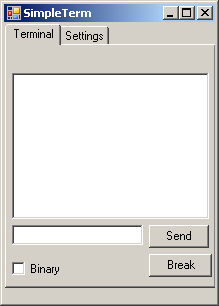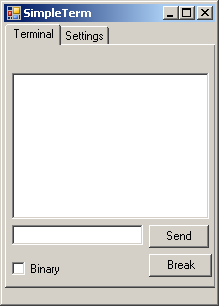
As always when you want to try a new technique or programming language, it works best if you have a goal. Just writing 'a program' , or re-typing exercises from books seldom gets me excited. So when I found out that .NET 2.0 finally contains a native Serial port control, I decided to create a terminal program for use on the Pocket PC. Since I often work with instruments that send (binary) data on a serial port, it's someting I wanted to have for a long time.
As mentioned before, the SharpDevelop 2.0 IDE is a very good environment for creating C# programs, but unfortunately it has no direct support for the Compact Framework. Yet it's not too dificult to get a simple Windos Forms application running on a Pocket PC with CF 2.0 installed.
First you must have the CF2.0 installed on your pc, and you should also install the
Windows Mobile 5.0 SDK. If you did this, you can find the CF assemblies in:
C:\Program Files\Microsoft.NET\SDK\CompactFramework\v2.0\WindowsCE
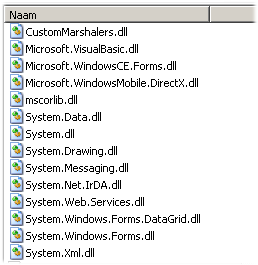
(At least, that's where they are on my computer.)
For convenience you can copy them to a root folder like C:\CF (like me), but you can also keep them where they are.
For the first try, keep it simple. Just create a new Windows Application from the File->New->Solution menu. Name it something like 'CFTest'. The designer presents an empty form, that's probably too large to fit on the screen of the Pocket PC, so resize it to 240 x 320 (the standard screen resolution for a Pocket PC) and place a button and label on it. You can also add an event handler to the button that for example changes the text of the label so you can check if the program is actually working.
Now you can compile and run it, just to see if this standard program works.
If so, it's time to change the settings so we can compile the same program for the CF.
First open the View->Projects window, and open the 'References' section on the project tree.
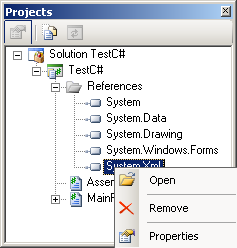
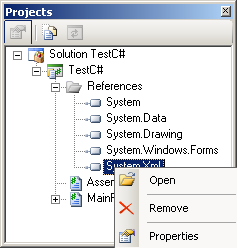
This will contain the default assembly references for a standard windows project. When you right-click on each assembly you get the 'Open, Remove, Properties' option as show here. Since all these references now point to the 'full' framework versions, you must delete them from the list. Click on each item, and choose 'Remove' untill the list is empty. Now right click the 'References', and select 'Add reference'. In the 'Add Reference' window, select the '.NET Assembly Browser' tab and click 'Browse'. Navigate to the folder with the CF assemblies (as shown above), and select all files with the .DLL extension. After closing the assembly browser by clicking OK, the Reference section in your project view should now contain only references to the CF assemblies. Note that one of the dll's is named 'mscorlib.dll'. This is the core library of the framework, and you might have noticed that it was not referenced in the standard project. This is because the compiler references this library automatically since it is always required for a .NET application. Unfortunately this means it always uses the default mscorlib.dll, which on a desktop computer, always belongs to the standard .NET library. To stop this unwanted behaviour we have to change the compile settings. Select Project->Project Options, and select the 'Compiling' tab. Here you can (and must) select
[x]Do not reference mscorlib.dll.
Now it's time to Run the program again, just to see that we end up with a disencouraging long list of errors. But this is actually the nice part. All errors are related to functions or properties that are unavailable in the Compact Framework, and these lines can just be removed (or better yet, commented out) without breaking the basic functionality of the program. So just click on each line of the error list to take you to the 'unsupported' line, and turn this line into a comment. Yes, even the [STAThread] directive at the beginning of the main program can be removed.
Now Run the program again, et voila.. it works. It actually still looks identical to the first run. But now you can copy the executable you just created to a Pocket PC, and it will run exactly like on your desktop.
 By using only CLR functions that are available in the Compact Framework I could build an application that runs on a PDA and a desktop, unchanged!. So it was exactly the same bytecode on both platforms. Now this does not work on the Mono platform (although there seems to be a way to patch the bytecode itself) but after I imported the project into MonoDevelop and just compiled it, it actually worked ! Which could be considered as a breakthrough merely for the fact that it supports serial communication !. So it's not just a 'Hello World window' with an OK button but its a real application that even supports the most underappreciated form of digital communication. And I say 'underappreciated' because the RS232 specification was established in 1969 and it has been the main form of communication between computers for over 35 years. But it is only since the release of System.IO.Serialport in version 2 of the CLR that serial communication is really supported out of the box in a mainstream development framework. I know this is not an issue for most people, but if you are working with instruments and microcontrollers whose only means of communication is still plain RS232 it is a real revelation.